Compare contents of files effortlessly
Compare Two Lists is a specialized software solution developed by Vovsoft for desktop computers. This handy utility tool enables you to perform set operations over lists of words or numbers. It is a list comparison program that saves you from the old-school way of comparing contents of two files which is to visually look for similarities and differences. Its entire service can be fully downloaded and experienced free-of-charge.
Top Recommended Alternative

Easily find the differences
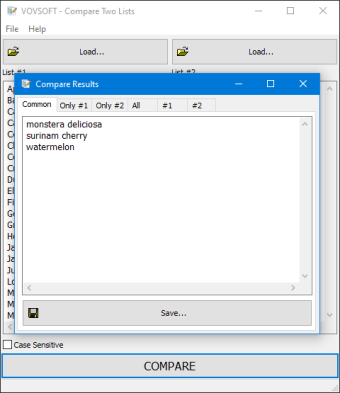
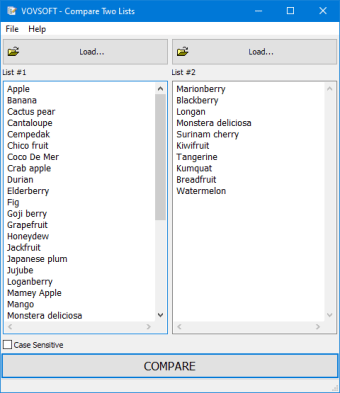
With its simple and intuitive user interface, it can cater to any type of user even those who don't have advanced computer skills. To start comparing data, you can either copy and paste your lists or select the two TXT files you would like to compare against each other. After you placed the contents of two files, you need to click the 'Compare' button to filter the similar and different words or numbers between the two lists.
If you want to get a result that is case-sensitive, you must tick the box in the bottom left corner of the program interface, just right above the 'Compare' button. You can either opt to view the detected records in both lists, or you can explore the records that are featured only in one of the lists, as well. Furthermore, detailed logs containing all the records in both lists will also be provided to you.
Once you have analyzed all the data of the tab results, you can proceed with selecting the type of result you want to be exported. However, bear in mind that this software solution only allows you to save the results to TXT files. You are free to set the type of encoding you desire for the output TXT file. You have the option to select from ANSI, ASCII, Unicode, Big Endian Unicode, UTF-8, and UTF-7.
Efficient comparison
Compare Two Lists is an effective utility software that could greatly help you in comparing data of two different files. With this, you no longer need to look for the similarities and differences between the two files manually. The only thing you need to do is to paste the data from the two lists or select two TXT files you would like to compare then, hit the 'Compare' button the get results. Either of these methods can be performed intuitively.